.png)

AWS Elastic Container Service (ECS) provides a built-in feature called the deployment circuit breaker, designed to make service deployments safer and more resilient.
This feature continuously monitors the health of tasks during a deployment and automatically rolls back changes if newly launched tasks fail to become healthy. When enabled, it prevents failed deployments from leaving services in a degraded or non-functional state.
Without this safeguard, deployment failures can easily go unnoticed. For example, if new tasks fail to start or never pass health checks, the service may still appear to be running while it is effectively broken. These silent failures can result in data loss, financial impact, or operational issues depending on the workload.
In this post, we’ll walk through how to enable the ECS deployment circuit breaker using Terraform, how to observe deployment failures via EventBridge, and how to send real-time alerts to Slack.
Enabling the deployment circuit breaker provides several important benefits:
-Automatic rollback – Failed deployments are reverted to the last known healthy service revision
-Improved visibility – ECS emits structured events whenever a deployment fails or rolls back
-Reduced operational overhead – Failures are mitigated automatically without immediate manual intervention
Together, these significantly reduce the risk of production incidents caused by faulty deployments.
The deployment circuit breaker can be enabled directly in your ECS service definition. In Terraform, this is done using the deployment_circuit_breaker block:
resource "aws_ecs_service" "default" {
  name            = "tuve"
  cluster         = aws_ecs_cluster.main.id
  task_definition = aws_ecs_task_definition.default.arn
  desired_count   = 2

  deployment_circuit_breaker {
    enable   = true
    rollback = true
  }

  ...
}
With this configuration in place, ECS will automatically stop and roll back a deployment if the new tasks fail to reach a healthy state.
Once enabled, the AWS Management Console clearly indicates that the Deployment circuit breaker is turned on.

Automatic rollback is useful, but visibility is just as important.
When the ECS deployment circuit breaker triggers, ECS emits events to Amazon EventBridge with the following detail type:
ECS Deployment State Change
Here is an example event payload:
{
  "version": "0",
  "id": "ddca6449-b258-46c0-8653-e0e3aEXAMPLE",
  "detail-type": "ECS Deployment State Change",
  "source": "aws.ecs",
  "account": "111122223333",
  "time": "2020-05-23T12:31:14Z",
  "region": "eu-central-1",
  "resources": [
    "arn:aws:ecs:eu-central-1:111122223333:service/default/servicetest"
  ],
  "detail": {
    "eventType": "ERROR",
    "eventName": "SERVICE_DEPLOYMENT_FAILED",
    "deploymentId": "ecs-svc/123",
    "updatedAt": "2020-05-23T11:11:11Z",
    "reason": "ECS deployment circuit breaker: task failed to start."
  }
}Some fields in this event are particularly useful for monitoring and alerting:
-eventName
SERVICE_DEPLOYMENT_FAILED
SERVICE_DEPLOYMENT_ROLLBACK_COMPLETED
-reason – Explains why the deployment failed
-resources – Identifies the affected ECS service
-updatedAt – Indicates when the failure occurred
Tracking these fields ensures that deployment issues are visible immediately instead of being discovered hours later.
The AWS Management Console also provides clear visibility into rollback activity. After a failed deployment, the Deployments tab shows the rollback status along with the target service revision.
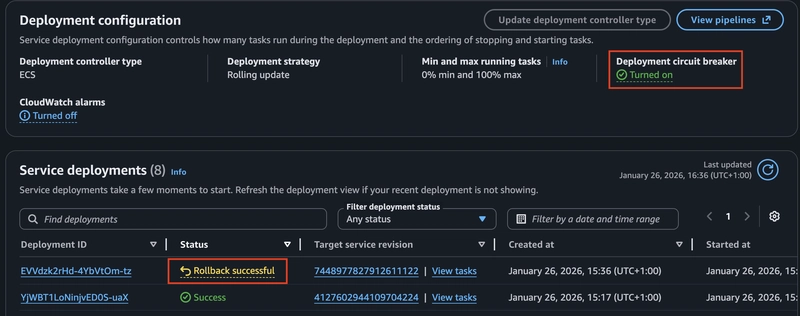
This view is particularly useful for confirming that the circuit breaker worked as expected.
To ensure deployment failures are noticed immediately, ECS deployment events can be routed to Slack using EventBridge and Lambda.
The overall flow looks like this:
ECS → EventBridge → Lambda → Slack
The Lambda function listens for ECS deployment state changes and sends notifications when a deployment fails or rolls back:
def lambda_handler(event, context):
    detail_type = event.get("detail-type", "")

    if detail_type == "ECS Deployment State Change":
        event_name = event.get("detail", {}).get("eventName")

        if event_name in [
            "SERVICE_DEPLOYMENT_FAILED",
            "SERVICE_DEPLOYMENT_ROLLBACK_COMPLETED"
        ]:
            detail = event.get("detail", {})
            resources = event.get("resources", [])
            service_name = resources[0].split("/")[-1] if resources else "unknown"
            reason = detail.get("reason", "Unknown")
            updated_at = detail.get("updatedAt", "Unknown")

            send_slack_notification(
                service=service_name,
                reason=reason,
                event_type=event_name,
                timestamp=updated_at
)The following EventBridge rule filters ECS deployment events and forwards them to the Lambda function:
resource "aws_cloudwatch_event_rule" "ecs_deployment" {
  name = "ecs-deployment-events"

  event_pattern = jsonencode({
    "source": ["aws.ecs"],
    "detail-type": ["ECS Deployment State Change"],
    "detail": {
      "eventName": [
        "SERVICE_DEPLOYMENT_FAILED",
        "SERVICE_DEPLOYMENT_ROLLBACK_COMPLETED"
      ]
    }
  })
}

resource "aws_cloudwatch_event_target" "lambda" {
  rule = aws_cloudwatch_event_rule.ecs_deployment.name
  arn  = aws_lambda_function.notification.arn
}After enabling the ECS deployment circuit breaker and adding Slack notifications:
-Failed deployments automatically roll back
-Silent service failures are eliminated
-Deployment issues become visible in real time
-ECS services are safer by default
By combining automated rollback with real-time alerts, you can significantly reduce operational risk and increase confidence in your ECS deployments.
.svg)

.svg)

.svg)
.svg)

.svg)
.svg)
.svg)
.svg)


.svg)
.svg)


